

OzWin Casino App: How to Play on Mobile Without a Download
Table of contents
OzWin Casino doesn't offer a downloadable app for Android or iOS — instead, the entire pokies and table games library runs through your phone's browser, so there's nothing to install from an app store before you can play. You can log in, deposit, claim the welcome bonus and spin Real Time Gaming pokies from Safari or Chrome exactly as you would on a desktop, with every feature carrying across without a separate mobile-only version. Adding a home screen shortcut takes a minute and gives you app-style one-tap access from then on.
Is There an OzWin Casino App to Download?
There's no dedicated OzWin Casino app sitting in the Google Play Store or Apple App Store, and that's a deliberate design choice rather than a missing feature. The casino runs on a responsive, browser-based platform that detects your screen size and reshapes the lobby, Cashier and account menus automatically, whether you're holding a compact phone or a larger tablet propped up on a train tray table.
Because everything loads through the browser, there's nothing to download from an app store, nothing to update in the background, and no compatibility checks to pass before you start playing. The same Real Time Gaming engine that powers the desktop pokies drives the mobile versions too, so touch controls, autoplay settings and bonus features behave identically on a phone screen as they do on a monitor. Players must be aged 18 and over to register and play, and the Curacao eGaming licence covering the platform applies equally to desktop and mobile sessions, so switching devices never changes the terms you're playing under.
OzWin Casino Mobile Access at a Glance
| Feature | Details |
|---|---|
| App Download | Not required — play directly through your mobile browser |
| Supported Devices | Android and iOS phones and tablets |
| Browsers | Chrome, Safari and other modern mobile browsers |
| Home Screen Shortcut | Yes — add an icon via your browser's share or menu option |
| Game Library on Mobile | 250+ Real Time Gaming pokies and table games |
| Mobile Support | Live chat and email available 24/7 |
| Currencies on Mobile | AUD and Bitcoin |
Adding OzWin Casino to Your Phone's Home Screen
A home screen shortcut is the closest thing to a native app experience you'll get, and setting it up takes under a minute on either major mobile operating system — no app store visit required.
On an iPhone or iPad, open the site in Safari, tap the Share icon along the bottom of the screen, then scroll down and choose "Add to Home Screen" before confirming the name you'd like to see under the icon. On an Android phone, open the site in Chrome, tap the three-dot menu in the top corner, select "Add to Home screen", and confirm the prompt that follows. Either path leaves an OzWin Casino icon sitting on your home screen alongside your other apps, and tapping it opens straight to the login page — no typing a URL or digging through browser bookmarks each time you want to play a session.
What You Can Do on the OzWin Casino Mobile Site
The mobile browser version isn't a stripped-down preview — it carries the full experience across to your phone.
- Browse the entire library of 250+ Real Time Gaming pokies and table games, filtered by category just like on desktop.
- Open the Cashier to deposit or withdraw using the same payment methods available on desktop, including Bitcoin and Ether for players who prefer crypto.
- Claim the welcome bonus and enter promo codes directly from the Cashier screen after your first deposit.
- Track your progress through the loyalty tiers, from Tourist up through Pathfinder, Adventurer, Expert, Hero and Absolute Legend.
- Reach the support team through live chat around the clock, or send a message by email if you'd rather wait for a written reply.
Rotating your phone to landscape mode gives pokies with wider reel layouts more room to display their symbols and bonus animations, and the interface adjusts instantly without reloading the page. Weekly promotions such as the Crystal Ball of Ozwin draw and the Friday OzDeal offer are also fully accessible on mobile, so there's no need to switch to a computer to keep up with ongoing deals.
Add OzWin Casino to Your Home Screen
Follow these steps on your phone's browser to set up one-tap access without installing anything.
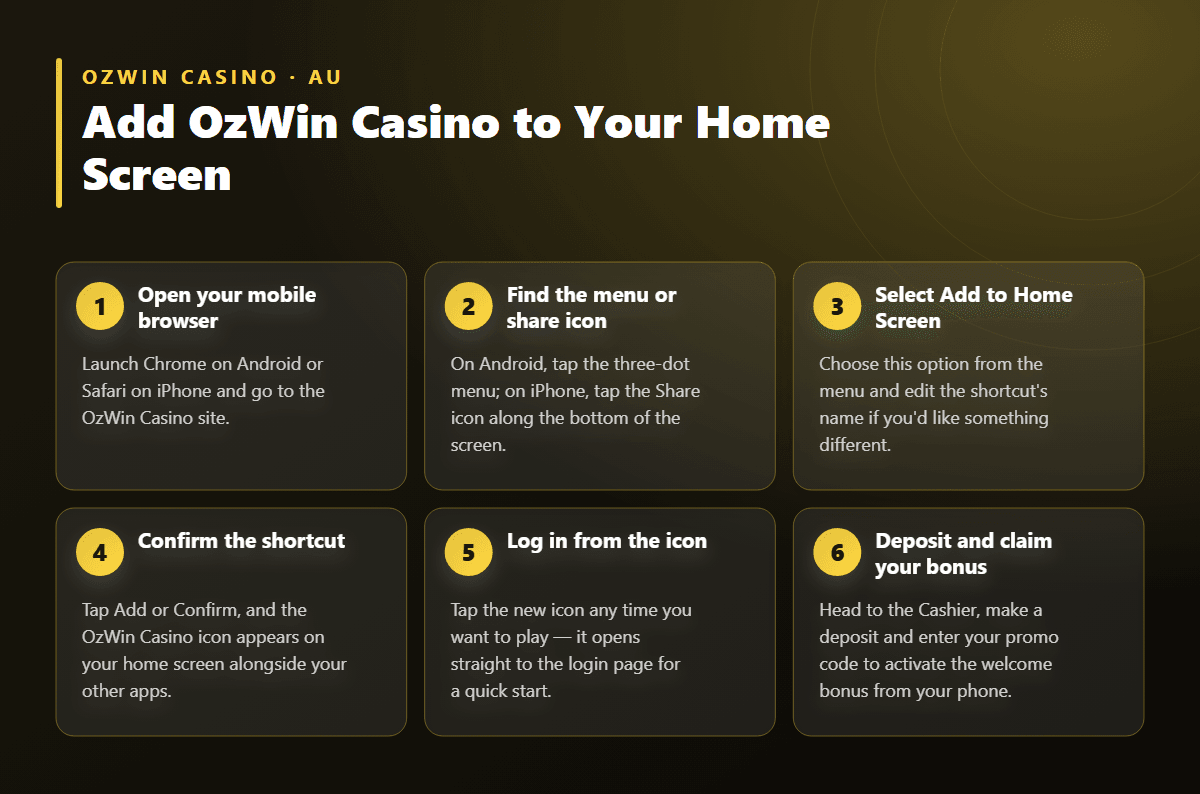
- Open your mobile browser Launch Chrome on Android or Safari on iPhone and go to the OzWin Casino site.
- Find the menu or share icon On Android, tap the three-dot menu; on iPhone, tap the Share icon along the bottom of the screen.
- Select Add to Home Screen Choose this option from the menu and edit the shortcut's name if you'd like something different.
- Confirm the shortcut Tap Add or Confirm, and the OzWin Casino icon appears on your home screen alongside your other apps.
- Log in from the icon Tap the new icon any time you want to play — it opens straight to the login page for a quick start.
- Deposit and claim your bonus Head to the Cashier, make a deposit and enter your promo code to activate the welcome bonus from your phone.
Registering and Logging In From Your Phone
Opening an account on mobile uses the exact same form as the desktop site, just resized to fit a smaller screen and arranged so each field sits comfortably above the on-screen keyboard. Tap through to sign up, fill in your personal details, pick your preferred currency, and confirm your email address to activate the account — your phone's autofill tools usually make this quicker than typing the same details on desktop.
Once registered, returning to play is just as straightforward through the login page: enter your email and password, and you're back in the lobby in moments. If you've already added the home screen shortcut, this login screen is what greets you every time you tap the icon, so there's rarely more than a couple of taps between picking up your phone and placing your first bet of the session.
Why Browser Play Suits Mobile Players
Skipping a native app isn't a downside — for plenty of players it's the more convenient setup. There's no file sitting in your phone's storage taking up space you'd rather use for photos, no update notifications interrupting a session, and no risk of an outdated cached version causing glitches, because every player loads the current live site the moment they connect.
It also means your account carries across devices without any extra setup on your part. Start a session on your phone during a commute, then pick up exactly where you left off on a laptop later that evening — your balance, loyalty points and bonus progress stay in sync because it's the same account, not a separate app-only profile that needs its own sign-in. For players who switch phones or move between Android and iOS, that also means no reinstalling or re-authorising anything; you simply log in and continue exactly where you were.
Mobile Payments and Security
Depositing from your phone uses the same Cashier and the same range of payment methods available on desktop, including Visa, MasterCard, eZeeWallet, CashtoCode, Neosurf, Apple Pay, Google Pay and crypto options such as Bitcoin, Lightning Bitcoin and Ether. A minimum deposit of $20 applies whichever device you're using, and entering a welcome bonus promo code works exactly the same way on mobile as it does on desktop.
The mobile site runs on the same encrypted connection as the desktop version, so account details and transaction data stay protected whether you're playing on home wifi or mobile data. Withdrawal requests can be submitted from your phone too, though identity verification documents are easier to upload from a device with a clear camera and good lighting. Support is available around the clock through live chat or email, which is particularly handy if you run into a question about a deposit while you're out and the Cashier isn't behaving as expected.